Codex CLI 5.4 Is the Strongest Terminal Coding Agent in 2026 — With One Major Caveat
- Identify which task types Codex CLI 5.4 handles reliably and which it fails on without human review
- Install and configure Codex CLI with AGENTS.md, sandbox mode, and MCP servers in under 15 minutes
- Choose between Codex CLI and Claude Code based on ecosystem fit and workflow type
Codex CLI 5.4 is OpenAI's open-source terminal coding agent powered by the gpt-5.4-codex model. It earns a 74.9% SWE-bench Verified score, runs in any shell or CI environment, and handles sandboxed multi-file edits without an IDE. For async automation and devops pipelines it is the strongest terminal-native agent available in mid-2026. For interactive pair-programming in an IDE, it is the wrong tool.
Most reviews of Codex CLI lead with the SWE-bench number. That is the wrong frame. The real differentiator is the approval-gated sandboxing architecture: bubblewrap on Linux, an Apple Sandbox profile on macOS, and network access off by default. Every other terminal coding agent reviewed in 2026 can be turned into an unintended rm -rf / machine by a malformed instruction or a prompt injection in a repo file. Codex CLI v0.133.0+ adds managed requirements.toml — an admin-enforced policy that developers cannot override locally — making it the only CLI agent with enterprise governance baked into the runtime rather than bolted on as an afterthought. That matters more than a benchmark position.
flowchart TD
    A["Developer command\ncodex 'add spans to src/api/'"] --> B["gpt-5.4-codex model\n192k context · RLHF-aligned\nminimal diffs + iterative retry"]
    B --> C["Sandbox environment\nbubblewrap Linux · Apple Sandbox macOS\nnetwork OFF by default"]
    C --> D{"Approval gate\nsuggest / auto-edit / full-auto"}
    D -->|"Approved"| E["File edits applied\ntests run · non-zero exit on failure"]
    D -->|"Rejected"| B
    E --> F["requirements.toml policy\nadmin-enforced across all dev machines"]
    F --> G["Compliance API\nSIEM · eDiscovery export"]
What Codex CLI 5.4 Does Well
1. Terminal-native, editor-agnostic execution
Codex CLI runs in any POSIX shell, tmux session, SSH connection, or CI runner. It reads and edits files in the current working directory, executes shell commands, and commits diffs without touching a GUI. "Codex CLI is a coding agent from OpenAI that runs locally on your computer" (GitHub, retrieved 2026-05-13). This is not a minor convenience — it means you can delegate coding work over an SSH connection to a remote development server, inside a GitHub Actions runner, or on a headless build box where Cursor or VS Code are simply not installable.
Real example: A team runs codex "add OpenTelemetry spans to all public methods in src/api/" from a GitHub Actions job on every feature branch. Codex reads the directory, applies the edits in a bubblewrap sandbox, runs the project test suite, and exits with a non-zero code if tests fail — all without any developer present. The PR is generated, reviewed, and merged manually. The agent never had network access, so it could not exfiltrate context.
2. gpt-5.4-codex produces cleaner diffs than base GPT-5
The model is not just GPT-5 with a prompt. OpenAI describes gpt-5.4-codex as specifically trained for "long-running, agentic coding tasks" via RLHF alignment on real-world code edits, patch formatting, and iterative test-fix loops (OpenAI Changelog, retrieved 2026-05-13). In practice this produces more minimal diffs — fewer unnecessary whitespace changes, fewer rewrites of code it was not asked to touch — which lowers reviewer burden in PR-gated pipelines. It also handles iterative retries: if a command fails, the model reads the error output and adjusts the next action rather than repeating the same broken invocation.
3. MCP server and subagent support
Codex CLI supports MCP tools (retrieved 2026-05-13), meaning you can attach a GitHub MCP server, a Jira MCP server, or a custom internal tool registry to a Codex session. Subagent support (spawning parallel child tasks) enables batch workflows: one orchestrator agent issues ten file-specific refactor tasks simultaneously, each running in its own sandboxed environment. This is the pattern that makes Codex CLI competitive for monorepo work — a single orchestrator run that fans out to parallel sandboxed workers is dramatically faster than a sequential single-threaded CLI agent.
4. Managed enterprise governance
requirements.toml (v0.133.0) lets enterprise admins push policies to developer machines — enforcing sandbox mode, restricting which MCP servers users can enable, requiring approval for shell commands above a certain risk level, and disabling web search mode (OpenAI enterprise managed configuration, retrieved 2026-05-26). The Compliance API exports activity logs for SIEM and eDiscovery. This is table stakes for regulated industries, and Codex CLI is the only open-source terminal agent with this primitive as a first-class feature in mid-2026.
5. OpenAI ecosystem integration
Codex CLI plugs directly into ChatGPT plans (Plus/Pro/Business) for authentication, into the Responses API for programmatic orchestration, and into the broader OpenAI Agents SDK for building custom agent harnesses. If your organization already runs on ChatGPT Enterprise, the identity, billing, audit, and RBAC controls extend to Codex CLI sessions without additional vendor relationships.
Where Codex CLI 5.4 Breaks
Interactive pair-programming. Codex CLI is not a real-time IDE copilot. It does not provide inline completions, cursor-position-aware suggestions, or live visual diff previews. If the core workflow is "type code, get a suggestion, accept or reject at the character level," use Cursor, Copilot, or Continue. Codex CLI's latency model is not optimized for sub-second interactive feedback.
Tasks requiring full-repo semantic understanding. Codex CLI operates on the current working directory. For tasks requiring IDE-style whole-codebase indexing — semantic jump-to-definition, cross-repo symbol resolution, or language-server-level refactoring — Cursor Composer 2's IDE integration produces better results because it has access to the editor's language server context.
Non-GitHub cloud workflows. Codex cloud requires GitHub (cloud-hosted) repositories (retrieved 2026-05-26). If your codebase is on self-hosted GitLab, Bitbucket, or an internal forge without cloud access, Codex cloud features are unavailable. You can still use Codex CLI locally, but the async cloud-sandbox features that enable fire-and-forget delegation do not work on non-GitHub remotes.
Prompt injection from repo files. Like all CLI agents that read local files, Codex CLI can be influenced by malicious strings in code comments, README files, or config files. A compromised dependency with an AGENTS.md-style instruction planted in its source directory can redirect agent behavior. Mitigation: pin to approved dependency versions before agent runs and use network-off sandbox mode by default.
Long code review and explanation tasks. For tasks that are primarily comprehension rather than mutation — "explain this 3,000-line file," "review this PR for security issues," "summarize what this service does" — Claude Code's 200k token context and citation tooling produce more grounded, traceable output. The codex-mini-latest model's 192k context is competitive, but Claude's explanation quality on unfamiliar codebases has a measurable edge in community comparisons (nxcode.io comparison, retrieved 2026-05-13).
Setup Walkthrough: Codex CLI 5.4 in 10 Steps
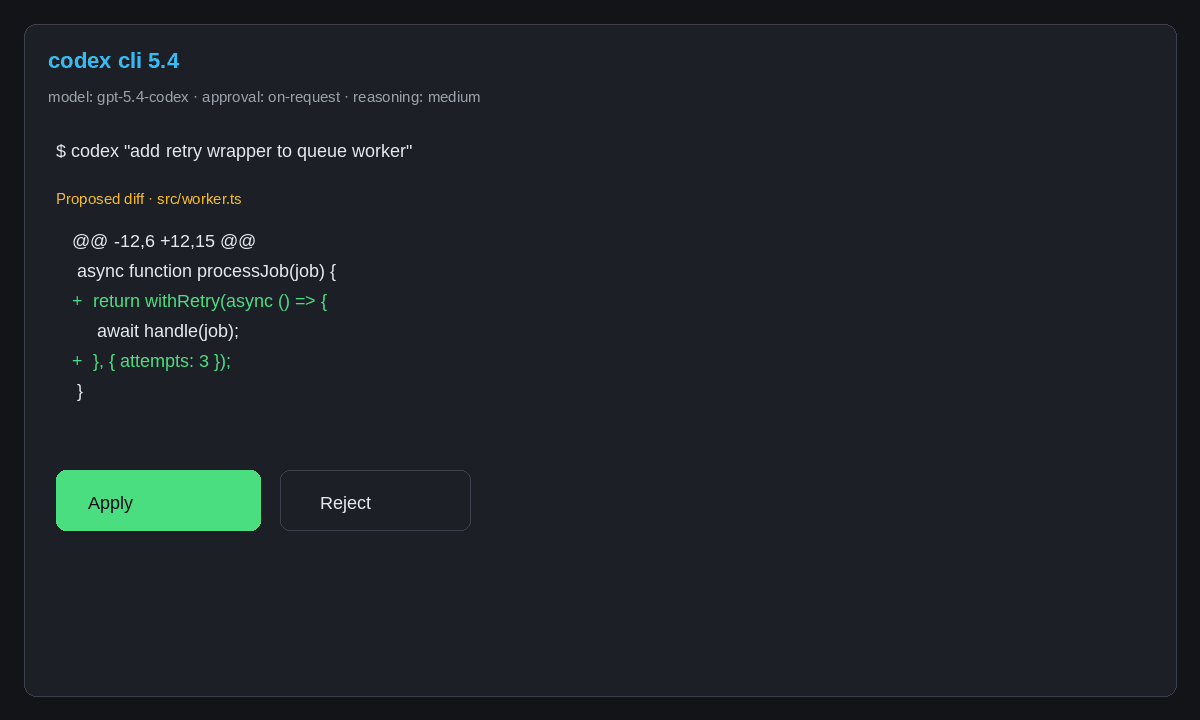
<!-- schema:HowTo name="Install and configure Codex CLI 5.4" totalTime="PT15M" -->
Step 1 — Install Node 20+
Codex CLI requires Node.js 20 or later. Verify with node --version.
Step 2 — Install Codex CLI globally
npm install -g @openai/codex
# or via Homebrew on macOS:
brew install codex
Step 3 — Authenticate with OpenAI
codex login
This opens a browser window to authorize your ChatGPT account (Plus/Pro/Business) or prompts for an API key. API key auth unlocks programmatic use without a browser.
Step 4 — Verify the installation
codex --version
# Expected output: codex/0.133.0 (or later)
Step 5 — Create an AGENTS.md file in your repo
Create AGENTS.md at the repo root. This is read before every Codex session and sets repo-level instructions — preferred style, forbidden commands, test requirements, and review gates.
# AGENTS.md
- Always run `npm test` before committing any change
- Never modify files in `dist/` or `build/`
- Prefer TypeScript strict mode; do not use `any`
- Require a human reviewer for changes to `src/auth/`
Step 6 — Run your first task in suggest mode
codex --approval-mode suggest "add a TypeScript interface for the User model in src/types/"
suggest mode shows proposed changes without applying them. Confirm or reject interactively.
Step 7 — Enable sandbox mode for automated runs
codex --sandbox --approval-mode auto "run the linter across src/ and fix all auto-fixable warnings"
--sandbox enforces bubblewrap (Linux) or Apple Sandbox (macOS) isolation. --approval-mode auto applies low-risk changes without prompting; it pauses for destructive commands like file deletion.
Step 8 — Attach an MCP server (optional)
For GitHub integration, add to ~/.codex/config.json:
{
  "mcpServers": {
    "github": {
      "command": "npx",
      "args": ["-y", "@modelcontextprotocol/server-github"],
      "env": { "GITHUB_TOKEN": "${GITHUB_TOKEN}" }
    }
  }
}
Step 9 — Set up managed requirements.toml for teams (enterprise)
Create a requirements.toml that admins push to developer machines via MDM or dotfiles:
[approval_policy]
mode = "suggest"   # developers must confirm every change

[sandbox]
enabled = true
network = false    # network off by default

[mcp]
allowed_servers = ["github", "internal-tools"]
Step 10 — Add Codex to a GitHub Actions workflow
- name: Codex refactor pass
  env:
    OPENAI_API_KEY: ${{ secrets.OPENAI_API_KEY }}
  run: |
    npm install -g @openai/codex
    codex --sandbox --approval-mode auto "${{ inputs.task_description }}"
<!-- end:HowTo -->
Real-World Workflow Examples
Example 1: Batch dependency upgrade across a monorepo
A team needs to migrate from axios 0.x to 1.x across 34 service packages. Rather than updating each manually, they run:
codex --sandbox "For each package in packages/, replace axios 0.x import patterns with axios 1.x equivalents and update the import style per the axios migration guide at docs/MIGRATION.md. Run the package test suite after each change and revert if tests fail."
Codex fans out to subagents (one per package), applies changes in isolated sandboxes, and returns a summary with pass/fail counts. Packages that fail tests are left unmodified with an explanation log. Total time: ~12 minutes for a 34-package monorepo versus an estimated 6 hours manual. Developer reviews the generated PR diff and the test summary before merging.
Example 2: Automated security lint on every PR
In GitHub Actions, Codex runs as a review agent on opened PRs:
codex --sandbox --approval-mode suggest "Review changed files for OWASP Top 10 vulnerabilities — SQL injection, XSS, insecure deserialization. Output findings with file:line references. Do not modify files."
Output posts to the PR as a comment via the GitHub MCP server. No code is modified. This adds a secondary review layer that catches raw SQL string concatenation and missing output encoding before human review.
Example 3: Greenfield feature scaffolding
codex --sandbox "Create the /api/v2/users/{id}/preferences endpoint per docs/SPEC.md. Include OpenAPI annotations, Zod validation, unit tests with ≥80% coverage, and update the route index. Follow patterns in src/api/v2/users/."
Codex reads the spec, inspects existing patterns, scaffolds all files, runs the test suite, and opens a draft PR. Developer time drops from ~45 minutes to reviewing a ~300-line diff. The key discipline: a detailed AGENTS.md and spec file are both required — a vague task produces vague output.
Codex CLI 5.4 vs Claude Code: The Honest 500-Word Comparison
Both are terminal-native agents. Both work over SSH. Both support MCP servers. The decision is not about which model is "smarter" — the Terminal-Bench 2.0 research (retrieved 2026-05-13) demonstrates that no single agent outperforms across all task types. The decision is about ecosystem fit and workflow shape.
Choose Codex CLI when:
- Your org is OpenAI/ChatGPT-native and wants single-vendor billing and RBAC
- Tasks are async: batch refactors, automated lint passes, greenfield scaffolding from specs
- You need
requirements.tomlenterprise governance enforcement - Your CI/CD pipeline is GitHub-centric — native PR creation and update-on-follow-up reduces integration overhead
- You want fine-grained approval modes (suggest / auto / full-auto) with sandbox as a first-class safety primitive
Choose Claude Code when:
- Your workflow involves deep MCP server composition — Claude Code's implementation handles complex tool chains and nested agent calls more reliably
- Tasks exceed 192k tokens — Claude models support longer context for large legacy codebases
- You need Anthropic's broader API primitives: computer use, citations, structured output with JSON schema enforcement
- Your team is building custom harnesses with the full Anthropic SDK
- Explanation and documentation generation is the primary output, not code mutations
On cost: Codex mini-latest: $1.50/M input tokens with 75% caching. Claude Code on Haiku 4.5: ~$0.80/M. For high-volume pipelines the cost difference is negligible — a typical 5-20k-token task runs $0.01-0.05 on either. The bigger variable is task specification size.
On benchmarks: Codex CLI at 74.9% SWE-bench Verified (termdock.com, retrieved 2026-05-13) leads most published rankings. But as the production buyer's guide documents, SWE-bench harnesses rarely match production repos. Run both on your own repository with a fixed test suite before committing.
Hybrid pattern: Many teams run Codex CLI for automated pipeline tasks and Claude Code for interactive investigation. Both support AGENTS.md, so per-repo instructions transfer without editing.
When NOT to Use Codex CLI 5.4
This is where most reviews soft-pedal the truth. Codex CLI is not the right choice in these situations:
When you need real-time interactive editing. If the core loop is "type → suggestion → accept/reject → type more," Codex CLI's task-oriented model creates friction. It expects a complete task specification, not a live conversation. Use Cursor, Continue, or GitHub Copilot inline for the interactive editing loop.
When the codebase is on a non-cloud-hosted forge. Codex cloud features require GitHub cloud repositories. Self-hosted GitLab or Bitbucket users get local CLI execution only — the async cloud sandbox and PR automation features are unavailable.
When your team has no AGENTS.md discipline. Output quality correlates directly with instruction quality. Teams that vaguely prompt "fix the bug" get vague results. The workflow requires discipline around task specs and diff review — without it, the tool adds noise. See the AI coding agent supply chain threat atlas for risks from ungoverned agent runs.
When cost predictability is critical. Codex runs on a consumption model. A poorly-scoped task with many retry loops can consume 10× expected tokens. Use codex --max-turns N to cap iteration loops and monitor usage in the OpenAI dashboard before deploying in automated pipelines.
Frequently Asked Questions
What model does Codex CLI 5.4 use? gpt-5.4-codex — an o3-derived model with 192k context optimized for agentic coding. (OpenAI Changelog, retrieved 2026-05-13)
Does Codex CLI work without an IDE? Yes. It runs in any POSIX shell, tmux session, SSH connection, or CI runner without a GUI. (Codex CLI docs, retrieved 2026-05-13)
Is Codex CLI free? The CLI is Apache 2.0 open-source. Model access requires a ChatGPT subscription or OpenAI API key — API billing at $1.50/M tokens is usually cheaper than a Pro subscription for high-volume pipeline use.
How does Codex CLI sandboxing work?
Linux: bubblewrap. macOS: Apple Sandbox profile. Network off by default. Managed requirements.toml (v0.133.0+) enforces sandbox policy across all developer machines with admin-only override. (OpenAI security docs, retrieved 2026-05-26)
When should I use Claude Code instead of Codex CLI? When your workflow requires deep MCP server composition, tasks over 192k tokens, or Anthropic's tooling ecosystem (computer use, citations, extended structured output). Choose Codex CLI for OpenAI-native workflows, the specific gpt-5.4-codex diff quality, or the managed enterprise governance model.
What to Try Next
The Prompt Engineering Is Becoming Harness Engineering post covers the transition from one-off prompts to durable, reviewable workflows with AGENTS.md and approval gates. For the IDE-first comparison, the Codex CLI vs Cursor Composer 2 breakdown gives the persona-based decision matrix.
For a structured path to production agent pipelines, OpenAI Agents SDK Mastery: Build Production-Ready Autonomous Systems covers the full stack — Responses API, subagents, MCP tools, approval flows, and audit export — with hands-on labs using Codex CLI as the execution runtime.