Continue.dev in 2026: The Model-Routing AI Assistant That Cuts Your API Bill in Half
- Understand Continue.dev's model-routing config and how it cuts API costs
- Know exactly when to choose Continue over Cline or Cursor
- Set up Continue in VS Code or JetBrains in under 10 minutes
Continue.dev is a free, open-source AI coding assistant (Apache 2.0) for VS Code and JetBrains that lets you wire any model — local or cloud — to specific roles: autocomplete, chat, edit, embed. The base extension costs nothing; you pay only for API tokens you consume. For teams that need cross-IDE support, centralized config sharing, and control over model costs, it is the strongest free option in 2026. See how it fits the broader agent landscape → · blog/ai-coding-agents-production-2026-buyers-guide
Most coverage of Continue.dev misses the point. Reviewers benchmark its agent mode against Cursor and declare it slower. That comparison is correct and irrelevant. Continue's competitive edge is not raw agent horsepower — it is model routing: the ability to assign a free 7B local model to autocomplete (hundreds of calls per day, effectively zero cost), and reserve a frontier API only for chat and edit (dozens of calls per day, modest bill). In a 10-developer team making 500 autocomplete completions per developer per day, replacing a cloud model at $0.0005/completion with Ollama drops that single line item by roughly $900/month. No other tool in 2026 makes this configuration this simple.
flowchart LR
    F["hub.continue.dev\nteam config sync\n(secrets encrypted)"] -->|"propagates"| A["config.yaml\nversion-controlled routing"]
    A --> B["autocomplete\nQwenCoder 2.5-7B via Ollama\n~$0/day"]
    A --> C["chat\nClaude Sonnet 4.6\nAnthropic API"]
    A --> D["edit\nCodestral Mistral\nMistral API"]
    A --> E["embed / rerank\nlocal model"]
What Continue.dev Actually Does Well
1. True cross-IDE support — the only one that matters for mixed teams
Continue is the only open-source AI coding extension with maintained support for both VS Code and the full JetBrains family (IntelliJ, PyCharm, WebStorm, GoLand). According to a 2026 comparison on dev.to, Continue is rated "best for teams" specifically because it spans both IDE ecosystems — a distinction Cline (VS Code-only) and Claude Code (terminal-only) cannot claim. For any team where backend engineers run IntelliJ and frontend engineers run VS Code, Continue is the only centrally-manageable option.
2. Explicit model routing: the config that pays for itself
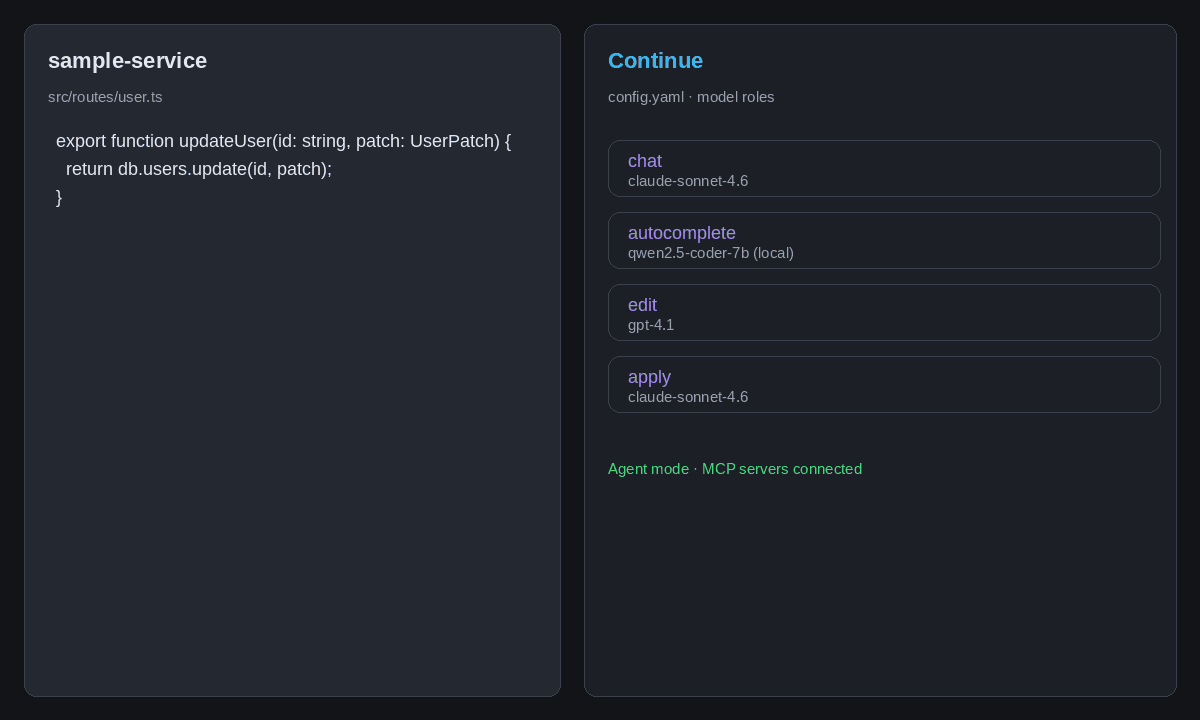
Continue's config.yaml lets you assign models to named roles: chat, edit, apply, autocomplete, embed, rerank, summarize. The routing is explicit and version-controlled — not a hidden heuristic. Continue's own docs recommend QwenCoder 2.5 (1.5B or 7B via Ollama) as the best free autocomplete model, and Codestral (Mistral) as the best closed option. The practical pattern that emerges from production use, as documented in the Continue.dev deep dive at Digital Applied, is: local model on autocomplete, hosted frontier model on chat and agent tasks. Three providers, one config, no glue code.
3. Hub configuration for team governance
Continue's Hub system at hub.continue.dev lets teams publish a shared config — preferred models, slash commands, coding rules, MCP server definitions — that every developer pulls with a single link. Secrets (API keys) are stored encrypted in Mission Control and never exposed in the config file. The official docs describe Hub configs as "perfect for teams" because a single config update propagates across the entire org on next reload. This solves the real enterprise problem: keeping 20 developers on the same model and rule set without a custom deploy pipeline.
4. MCP import from other tools — drop-in compatibility
Continue v1.4.47 added JSON MCP configuration support (changelog.continue.dev). If you already have MCP servers configured in Claude Desktop, Cursor, or Cline, you can copy those JSON config files directly into .continue/mcpServers/ and Continue picks them up automatically. No translation layer, no reformatting. For teams already invested in MCP tooling, this makes Continue a zero-friction addition to an existing workflow. See the full MCP picture → · blog/mcp-2026-roadmap-explained
5. Self-host and air-gap story the closed tools cannot match
Continue is Apache 2.0. You can fork it, audit it, and run it in an environment with no outbound internet — a procurement hard requirement in financial services, healthcare, and government. Commercial tools like Cursor or GitHub Copilot cannot offer this. For regulated industries, Continue plus local Ollama models is often the only compliant path to AI-assisted development at the IDE level.
Where Continue.dev Breaks
The inline editor (Cmd+I / Ctrl+I) is genuinely bad. Community reviews are consistent here: the inline diff UI shows changes as near-100% rewrites of the selected code even when the actual delta is small, and the accept/reject controls are hard to target. One widely-cited dev.to thread calls it "horrible" and notes there are no click-to-navigate shortcuts for files mentioned in chat output. Cursor wins this comparison decisively.
Agent mode is immature relative to Cline and Cursor. Continue's agent can read files, run terminal commands, and use MCP tools — but it does not have Cline's Plan/Act architecture, browser control, or Checkpoint system. For multi-step autonomous tasks (write tests, run them, fix failures, repeat), Cline completes these loops more reliably. Continue's agent is better understood as "enhanced chat with tools" rather than a fully autonomous coding agent.
@Codebase context fails behind corporate firewalls. Several users report that the @codebase and @file context providers fail silently when corporate proxies or firewall rules block the URLs Continue uses for its indexing service. This turns one of the key features into a liability in exactly the environments (large enterprises) where Continue's governance story is most compelling.
No built-in models means setup friction. Unlike Cursor or GitHub Copilot, Continue ships with zero bundled model access. First-time users must configure an API provider before the extension does anything useful. For developers who want to open VS Code and have AI working in 60 seconds, this is a real barrier.
Configuration complexity is real. The YAML schema is clean, but migrating from the legacy config.json format, understanding role assignment, and debugging silent failures when a model provider is misconfigured requires comfort with developer tooling. The Hub config helps teams manage this, but individual setup remains rougher than commercial alternatives.
Setup Walkthrough: Continue.dev in VS Code in 10 Steps
<schema:HowTo> Tool: Continue.dev | Time: 8–12 minutes | Prerequisite: VS Code 1.70+
- Install the extension. Open VS Code, go to Extensions (Ctrl+Shift+X), search "Continue", install the extension by
Continue. - Open the sidebar. Press
Cmd+L(macOS) orCtrl+L(Windows/Linux) to open the Continue chat panel. - Choose a config path. Click the agent selector at the top of the panel. Select "Hub" for team-managed config or "Local" for a personal setup you control.
- For local config, open config.yaml. Click the gear icon next to the local agent. The file opens at
~/.continue/config.yaml. - Add a chat model. Under the
modelskey, add a provider entry. Example for Anthropic:
models:
  - name: claude-sonnet-4-6
    provider: anthropic
    model: claude-sonnet-4-6
    apiKey: ${{ secrets.ANTHROPIC_API_KEY }}
    roles: [chat, edit]
- Add an autocomplete model. For zero-cost autocomplete with Ollama (requires Ollama installed with
qwen2.5-coder:7bpulled):
  - name: qwen-autocomplete
    provider: ollama
    model: qwen2.5-coder:7b
    roles: [autocomplete]
- Set your API key. For cloud providers, add your key as an environment variable or use the Hub's Mission Control secrets manager (recommended for teams).
- Reload config. Click "Reload config" in the Continue panel or restart VS Code. The agent selector should show your configured model.
- Test chat. Type a question in the chat input and press Enter. For codebase-aware chat, prefix with
@codebase. - (Optional) Add MCP servers. Create
.continue/mcpServers/in your project root. Drop any existing Claude Desktop or Cline JSON MCP config files into that folder. Continue loads them automatically on next reload. - </schema:HowTo>
Real-World Workflows
Workflow 1: Refactor a legacy service with @codebase
Open the chat panel, type @codebase refactor the UserService class to remove the singleton pattern and use dependency injection instead. Continue indexes your workspace, pulls relevant files into context, and proposes a diff spanning multiple files. Accept or reject per-file in the sidebar. This is where Continue's chat quality (backed by a frontier model) shines — the instructions are understood holistically, not just as a text completion.
Workflow 2: Shared team slash commands
In a Hub config, define a slash command:
prompts:
  - name: review
    description: Senior code review pass
    prompt: |
      Act as a senior engineer reviewing a PR. Flag: missing error handling,
      security issues, performance regressions, and style violations.
      Be specific. Reference the exact line.
Every developer on the team runs /review against selected code. The prompt is version-controlled in the Hub, updated centrally, and consistent across all IDEs — VS Code and JetBrains alike.
Workflow 3: PR review automation with CI agents
Continue's "Continuous AI" concept (in the Team/Company tier) extends the agent beyond the IDE into GitHub/GitLab PRs. Configure a CI agent to run an AI review on every pull request. The agent comments inline, checks against your defined coding rules, and flags issues before human review. This is the feature that positions Continue as infrastructure rather than just a plugin.
Continue.dev vs Cline: The Honest 500-Word Comparison
Both are free, open-source, BYOK extensions that support every major LLM provider. The surface-level feature list looks nearly identical. The real differences run deeper.
Where Cline wins outright:
Cline has a 5M+ VS Code install base (VS Code Marketplace) and a mature Plan/Act architecture that no Continue equivalent matches. In Plan mode, Cline lays out a full strategy before writing a line of code; in Act mode it executes with browser control, terminal execution, and Checkpoint rollbacks if something breaks. For a solo developer tackling a complex greenfield feature — "build me a REST API with auth, tests, and a Dockerfile" — Cline completes this autonomously with less intervention required than Continue.
Cline's MCP Marketplace is also more mature. It ships with a documented vendor integration list (Oracle, Firebase, SAP, and hundreds of community servers), a built-in marketplace UI, and a Rules system that scopes rule files to specific file patterns — keeping the system prompt lean. How MCP fits Continue vs Claude Code → · blog/2026-05-13-claude-skills-vs-mcp
Where Continue wins outright:
Continue is the only option if any developer on your team runs a JetBrains IDE. That fact alone ends many comparisons.
Team management is Continue's other hard advantage. The Hub config + Mission Control secrets system lets an engineering lead define a single authoritative config — models, rules, MCP servers, slash commands — and push it to 50 developers across two IDE ecosystems simultaneously. Cline has no equivalent team governance layer.
Continue's model routing is also more explicit and auditable than Cline's. Cline routes all calls through a single model selection; Continue lets you run a free local 7B model on autocomplete while reserving Claude Sonnet for reasoning-heavy chat. At scale, that cost discipline matters.
The verdict: Use Cline for autonomous single-developer agent work in VS Code. Use Continue for cross-IDE teams that need cost control, centralized governance, and CI/PR integration. They solve different problems.
Compare Continue in the broader agent landscape → · blog/cursor-3-2-vs-claude-code-workflow
When NOT to Use Continue.dev
Continue is the wrong tool in three specific situations:
When you need the sharpest autonomous agent. If your primary use case is "delegate a 3-hour task to an AI agent and review the PR," Cline or Claude Code outperform Continue's current agent implementation. The inline editor UX and agent immaturity are real productivity drags on high-autonomy workflows.
When you want zero-configuration AI in under 60 seconds. Continue requires YAML configuration before it does anything useful. GitHub Copilot or a trial of Cursor gives a new developer AI-assisted coding faster. For rapid onboarding or evaluations, Continue's setup cost is a real barrier.
When your team is locked into a single cloud provider. Continue's strength is model flexibility. If your org has a Copilot Enterprise contract that bundles everything, the model routing and Hub governance features are redundant overhead. Lean into the tool you're already paying for.
<schema:KnowledgeCheck> Knowledge Check
You're setting up Continue.dev for a 15-person team where 8 developers use VS Code and 7 use IntelliJ. You want autocomplete to run locally for cost reasons and chat to use Claude Sonnet. Which combination is uniquely achievable with Continue.dev but not with Cline?
A) BYOK with Anthropic API B) Cross-IDE deployment with unified Hub config C) MCP server integration D) Local model via Ollama
Correct answer: B. Cline is VS Code-only. Continue is the only tool in this list that spans both IDE ecosystems and supports centralized Hub config management — making B the capability that uniquely fits the 15-person mixed-IDE team scenario. All other options (A, C, D) are available in both tools. </schema:KnowledgeCheck>
Start Building with AI Tools in Your IDE
Understanding Continue.dev's model-routing architecture is the foundation — but applying it in production systems means knowing how to combine it with agents, MCP servers, and evaluation frameworks. The ai-coding-agents-production course covers the full stack: configuring multi-tool coding environments, writing effective agent rules, integrating MCP for database and CI tooling, and benchmarking AI-assisted workflows in real codebases.
<script type="application/ld+json"> { "@context": "https://schema.org", "@graph": [ { "@type": "BlogPosting", "headline": "Continue.dev in 2026: The Model-Routing AI Assistant That Cuts Your API Bill in Half", "datePublished": "2026-07-02", "dateModified": "2026-06-02", "author": { "@type": "Organization", "name": "Koenig AI Academy" }, "description": "Comprehensive Continue.dev review for 2026: model routing, Hub team configs, MCP integration, setup walkthrough, and honest comparison vs Cline.", "keywords": ["Continue.dev", "AI coding assistant", "VS Code extension", "JetBrains AI", "Cline vs Continue", "model routing", "BYOK AI coding"] }, { "@type": "HowTo", "name": "How to Set Up Continue.dev in VS Code", "totalTime": "PT12M", "step": [ { "@type": "HowToStep", "position": 1, "name": "Install the extension", "text": "Open VS Code Extensions, search 'Continue', install the extension by Continue." }, { "@type": "HowToStep", "position": 2, "name": "Open the sidebar", "text": "Press Cmd+L (macOS) or Ctrl+L (Windows/Linux) to open the Continue chat panel." }, { "@type": "HowToStep", "position": 3, "name": "Choose Hub or Local config", "text": "Click the agent selector and choose Hub for team config or Local for personal setup." }, { "@type": "HowToStep", "position": 4, "name": "Open config.yaml", "text": "Click the gear icon next to the local agent to open ~/.continue/config.yaml." }, { "@type": "HowToStep", "position": 5, "name": "Add a chat model", "text": "Add a provider entry under models with roles: [chat, edit]." }, { "@type": "HowToStep", "position": 6, "name": "Add an autocomplete model", "text": "Add a local Ollama model entry with roles: [autocomplete] for zero-cost completions." }, { "@type": "HowToStep", "position": 7, "name": "Set your API key", "text": "Add your API key as an environment variable or via Hub Mission Control secrets." }, { "@type": "HowToStep", "position": 8, "name": "Reload config", "text": "Click Reload config in the Continue panel or restart VS Code." }, { "@type": "HowToStep", "position": 9, "name": "Test chat", "text": "Type a question in the chat input. Use @codebase prefix for codebase-aware queries." }, { "@type": "HowToStep", "position": 10, "name": "Add MCP servers (optional)", "text": "Create .continue/mcpServers/ in your project root and drop JSON MCP config files in it." } ] }, { "@type": "FAQPage", "mainEntity": [ { "@type": "Question", "name": "Is Continue.dev completely free?", "acceptedAnswer": { "@type": "Answer", "text": "The extension is free and open source (Apache 2.0). You pay only for API tokens consumed. The Team plan is $20/seat/month with $10 in credits included and adds Hub configs, SSO, and access controls." } }, { "@type": "Question", "name": "Does Continue.dev work in JetBrains IDEs?", "acceptedAnswer": { "@type": "Answer", "text": "Yes. Continue is the only open-source AI coding assistant with maintained extensions for both VS Code and the full JetBrains suite including IntelliJ, PyCharm, and WebStorm." } }, { "@type": "Question", "name": "What is the best autocomplete model for Continue.dev?", "acceptedAnswer": { "@type": "Answer", "text": "Continue's docs recommend Codestral (Mistral) as the best closed model and QwenCoder 2.5 via Ollama as the best free local option for autocomplete in 2026." } }, { "@type": "Question", "name": "How does Continue.dev handle MCP servers?", "acceptedAnswer": { "@type": "Answer", "text": "Continue v1.4.47 added JSON MCP config support. Copy Claude Desktop, Cursor, or Cline JSON MCP configs into .continue/mcpServers/ and Continue loads them automatically. MCP is available in agent mode." } }, { "@type": "Question", "name": "Continue.dev vs Cline: which should I use?", "acceptedAnswer": { "@type": "Answer", "text": "Use Continue.dev for cross-IDE teams (VS Code + JetBrains), centralized Hub governance, and model cost control. Use Cline for autonomous single-developer agent work in VS Code with browser control and the Plan/Act architecture." } } ] } ] } </script>